Let’s read some logs!
In order to make use of web-based tools—and to diagnose and fix any problems—it helps to understand what normal behavior looks like.
That’s my excuse for reading my logs obsessively. The other reason is that my entire collection of tools resembles a slow-moving strategy game, and I enjoy the dopamine hits from seeing the wheels go ’round.
In this post, we’re going to do a deep dive into reading my website logs. If this level of detail doesn’t interest you, it’s OK to go read something with sex in it instead.
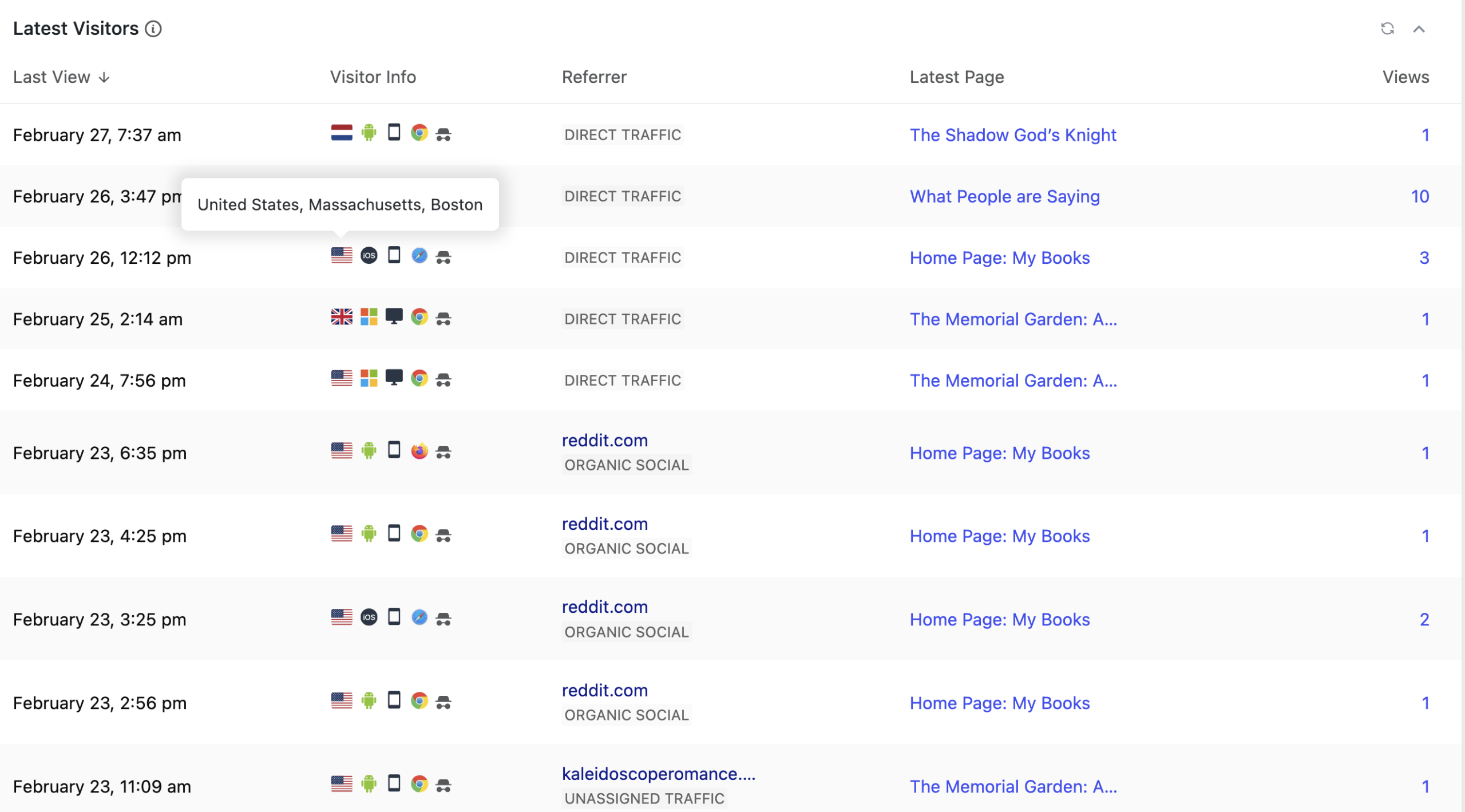
The screenshot in the featured image slot is from my WordPress logs as rendered by the free version of the plugin WPStatistics (I prefer one that doesn’t use Google). I almost never look at the console logs that report every last connection to my web site. Why?
- The console log includes the hits generated when I view or update something on my site. That’s a lot of hits. My WordPress log filters out my own traffic.
- Also not visible here is the constant flood of bots looking for security holes to exploit. I don’t need to see every time someone twists the knob to see if I left the door unlocked, which in practice means being dumb enough to have an account named “admin” with password “admin.”
- WPStatistics, even the free version, allows me to filter out some traffic. For instance, I filter out the entirety of Singapore, because those hundreds of hits are probably all from AI-scraping bots. Apologies to those of you who are reading this from Singapore right now.
- The WPStatistics package hashes (obscures) the IP address. I like knowing about my visitors, but your IP address is Too Much Information.
- My hosting company keeps seven days of raw logs. I did not in fact know that until I went to write my privacy policy, at which point I looked it up. WPStatistics keeps the aggregated statistics for longer than that.
Let’s look at this log snapshot column by column. Yes, I know that the graphic is oddly cropped. I’m still tinkering with it. Take my word for it on things you can’t see.
Latest View
This is a date and timestamp recording the last hit from a visitor.
The only interesting thing to say about Latest View is that I had this plugin running for about a year before I noticed that I could set the timezone. Thus until recently I had to do the math for the offset from GMT.
Visitor Info
Most of this information is populated from the useragent string that is a standard browser feature. Want to know what your browser has to say about you? Look up “useragent” in DuckDuckGo (click on this link.)
Let’s take the icons in this dense row in order.
- Location, expressed as a country flag. You can see the mouseover of one here: United States, Massachusetts, Boston. Bear in mind that the internet does not, in fact, know where your house is. It only knows the location reported by your network provider, which may be close or far away. If I look at my site from my phone, the location is reported as Holyoke, MA, a city that is 78 miles / 126 km from mine. Sometimes a log entry has a country flag and reports “Region/City not set,” which probably but not always means it’s a bot.
- Operating System expressed as a familiar icon. The typical ones are Android, iOS, MacOS, Windows and Linux. If the hit is from a bot, it will probably say Windows, though occasionally bots report they are Linux. Nothing forces a device to tell you what it really is. Back in the day when people rudely programmed their sites to only work in Internet Explorer and gave you an error otherwise, you could use a browser plugin to say you were using IE even if you weren’t.
- Device type, expressed as icons for desktop, smartphone or tablet. If you’re on a laptop, you’ll appear as a desktop. Strange, but true.
- Browser used to connect, expressed as an icon. The usual suspects are Chrome, Firefox, and Safari. Almost nobody uses Edge. Some people use the Chinese browser Yandex. Mousing over these icons will tell you what version of the browser is being used and whether it’s mobile or desktop. Sometimes you see a little question mark in a circle, which means there is no icon. There will be a description, though. A typical oddball is “headless Chrome,” which indicates some sort of automated process, i.e. a bot. The really interesting thing for me is that there are so many versions of Chrome that the version makes is possible to tell that entries with different hashes (see next item) are actually the same user. Bots are almost all using old versions of Chrome. If a bot is not using Chrome, it will probably lie and say that it is, because everyone wants to be one of the popular kids.
- Then there’s the little hat and sunglasses icon for the user hash, which is a mathematical function of the IP address and other information. This makes it possible to track individuals even when I can’t see their IP address. If you visit my site on two different days, you will get two different hashes and appear to be two different people. That’s fine by me. The information here is good enough for me to see what’s going on.
Referrer
This field tells me what people were looking at when they clicked a link that goes to my site. This is very valuable information, or would be if it said a bit more.
Most of the entries say “Direct Traffic,” which is supposed to mean that someone typed the address into the address bar. Yet almost nobody does that. Direct Traffic will show up if someone clicked the link they received in email.
You can see multiple instances of reddit, where I hang out when avoiding real work. May as well make a virtue of it. Sometimes I get traffic when I post in book discussions on r/femalegazesff or r/queersff, but most of my reddit-related traffic happens when I get in an argument with someone on r/boston. I also sometimes get referrals from posts I make to BlueSky.
At the bottom, you can see a hit referred by kaleidoscoperomance.com. That’s a cross-promotion with another author who puts together newsletters of related fiction. Check them out!
The log plugin helpfully keeps separate track of which search engines people use to find my site, which would be more interesting if paying for search engine ranking was at all useful for a small author (it’s not).
Views
The final column is the number of views. Clicking on that number brings me to a list of pages the visitor clicked on, in order. Often they go back and forth a few times.
Some Conclusions
There’s a lot more to the logs, but I’ll summarize the important bits for you.
- The oft-cited statistic for the web is that 70% of the traffic is mobile. My total is 38% smartphone and 35% desktop, the balance being tablets and headless devices. The smartphone traffic is probably all real people, the balance of it less so. The web is full of bots. Not all of them are evil. Search engine indexing is done by bots. But many of them are.
- Almost nobody looks at my blog posts, including this one.
- Most people who visit my site look at the front page and then wander off.
- A few people go to other parts of my click machine, including my Patreon or the signup for my newsletter, where they can get a free book in exchange for their email address. More on these next post. Some visitors run off and buy a copy of my books from one of the online retailers currently selling them.
What’s missing?
If you were paying attention, you might see that I’m guessing what generates any individual click: reddit or bsky posts, newsletter swaps, links shared on Discord. I could nail down the details by using tracking links. There are WordPress plugins that will generate unique links. I could therefore use one link on a social media post and another link in a newsletter.
In practice, I don’t have much traffic. Tracking links are too much work and too intrusive for what they’d get me. Also, I have some other pieces that are more informative.
More on my newsletter and book landing pages next post.