Category: Screed

  • The Indie Author Click Machine, Part 2

    The Indie Author Click Machine, Part 2

    Let’s read some logs!

    In order to make use of web-based tools—and to diagnose and fix any problems—it helps to understand what normal behavior looks like.

    That’s my excuse for reading my logs obsessively. The other reason is that my entire collection of tools resembles a slow-moving strategy game, and I enjoy the dopamine hits from seeing the wheels go ’round.

    In this post, we’re going to do a deep dive into reading my website logs. If this level of detail doesn’t interest you, it’s OK to go read something with sex in it instead.

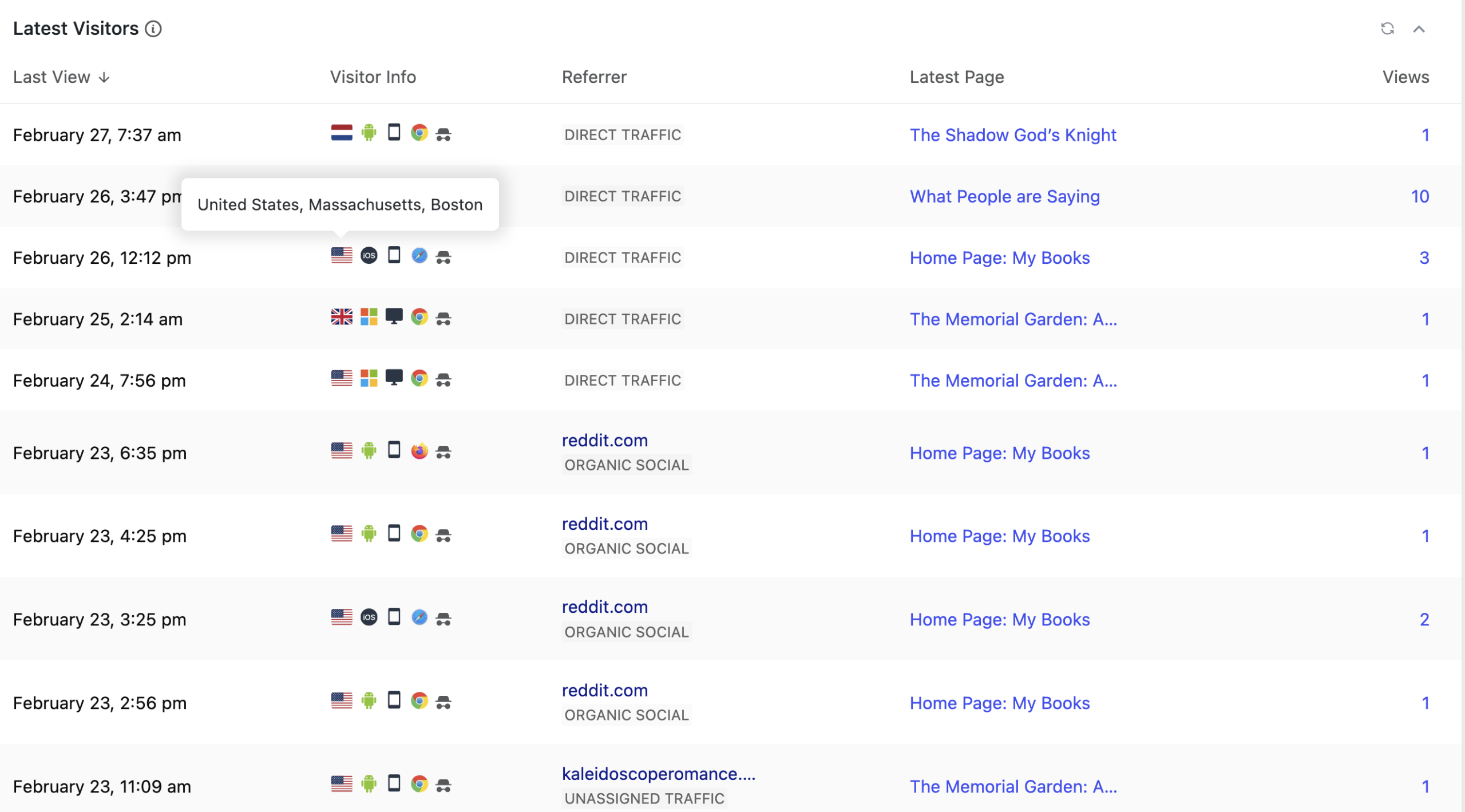
    The screenshot in the featured image slot is from my WordPress logs as rendered by the free version of the plugin WPStatistics (I prefer one that doesn’t use Google). I almost never look at the console logs that report every last connection to my web site. Why?

    • The console log includes the hits generated when I view or update something on my site. That’s a lot of hits. My WordPress log filters out my own traffic.
    • Also not visible here is the constant flood of bots looking for security holes to exploit. I don’t need to see every time someone twists the knob to see if I left the door unlocked, which in practice means being dumb enough to have an account named “admin” with password “admin.”
    • WPStatistics, even the free version, allows me to filter out some traffic. For instance, I filter out the entirety of Singapore, because those hundreds of hits are probably all from AI-scraping bots. Apologies to those of you who are reading this from Singapore right now.
    • The WPStatistics package hashes (obscures) the IP address. I like knowing about my visitors, but your IP address is Too Much Information.
    • My hosting company keeps seven days of raw logs. I did not in fact know that until I went to write my privacy policy, at which point I looked it up. WPStatistics keeps the aggregated statistics for longer than that.

    Let’s look at this log snapshot column by column. Yes, I know that the graphic is oddly cropped. I’m still tinkering with it. Take my word for it on things you can’t see.

    Latest View

    This is a date and timestamp recording the last hit from a visitor.

    The only interesting thing to say about Latest View is that I had this plugin running for about a year before I noticed that I could set the timezone. Thus until recently I had to do the math for the offset from GMT.

    Visitor Info

    Most of this information is populated from the useragent string that is a standard browser feature. Want to know what your browser has to say about you? Look up “useragent” in DuckDuckGo (click on this link.)

    Let’s take the icons in this dense row in order.

    • Location, expressed as a country flag. You can see the mouseover of one here: United States, Massachusetts, Boston. Bear in mind that the internet does not, in fact, know where your house is. It only knows the location reported by your network provider, which may be close or far away. If I look at my site from my phone, the location is reported as Holyoke, MA, a city that is 78 miles / 126 km from mine. Sometimes a log entry has a country flag and reports “Region/City not set,” which probably but not always means it’s a bot.
    • Operating System expressed as a familiar icon. The typical ones are Android, iOS, MacOS, Windows and Linux. If the hit is from a bot, it will probably say Windows, though occasionally bots report they are Linux. Nothing forces a device to tell you what it really is. Back in the day when people rudely programmed their sites to only work in Internet Explorer and gave you an error otherwise, you could use a browser plugin to say you were using IE even if you weren’t.
    • Device type, expressed as icons for desktop, smartphone or tablet. If you’re on a laptop, you’ll appear as a desktop. Strange, but true.
    • Browser used to connect, expressed as an icon. The usual suspects are Chrome, Firefox, and Safari. Almost nobody uses Edge. Some people use the Chinese browser Yandex. Mousing over these icons will tell you what version of the browser is being used and whether it’s mobile or desktop. Sometimes you see a little question mark in a circle, which means there is no icon. There will be a description, though. A typical oddball is “headless Chrome,” which indicates some sort of automated process, i.e. a bot. The really interesting thing for me is that there are so many versions of Chrome that the version makes is possible to tell that entries with different hashes (see next item) are actually the same user. Bots are almost all using old versions of Chrome. If a bot is not using Chrome, it will probably lie and say that it is, because everyone wants to be one of the popular kids.
    • Then there’s the little hat and sunglasses icon for the user hash, which is a mathematical function of the IP address and other information. This makes it possible to track individuals even when I can’t see their IP address. If you visit my site on two different days, you will get two different hashes and appear to be two different people. That’s fine by me. The information here is good enough for me to see what’s going on.

    Referrer

    This field tells me what people were looking at when they clicked a link that goes to my site. This is very valuable information, or would be if it said a bit more.

    Most of the entries say “Direct Traffic,” which is supposed to mean that someone typed the address into the address bar. Yet almost nobody does that. Direct Traffic will show up if someone clicked the link they received in email.

    You can see multiple instances of reddit, where I hang out when avoiding real work. May as well make a virtue of it. Sometimes I get traffic when I post in book discussions on r/femalegazesff or r/queersff, but most of my reddit-related traffic happens when I get in an argument with someone on r/boston. I also sometimes get referrals from posts I make to BlueSky.

    At the bottom, you can see a hit referred by kaleidoscoperomance.com. That’s a cross-promotion with another author who puts together newsletters of related fiction. Check them out!

    The log plugin helpfully keeps separate track of which search engines people use to find my site, which would be more interesting if paying for search engine ranking was at all useful for a small author (it’s not).

    Views

    The final column is the number of views. Clicking on that number brings me to a list of pages the visitor clicked on, in order. Often they go back and forth a few times.

    Some Conclusions

    There’s a lot more to the logs, but I’ll summarize the important bits for you.

    • The oft-cited statistic for the web is that 70% of the traffic is mobile. My total is 38% smartphone and 35% desktop, the balance being tablets and headless devices. The smartphone traffic is probably all real people, the balance of it less so. The web is full of bots. Not all of them are evil. Search engine indexing is done by bots. But many of them are.
    • Almost nobody looks at my blog posts, including this one.
    • Most people who visit my site look at the front page and then wander off.
    • A few people go to other parts of my click machine, including my Patreon or the signup for my newsletter, where they can get a free book in exchange for their email address. More on these next post. Some visitors run off and buy a copy of my books from one of the online retailers currently selling them.

    What’s missing?

    If you were paying attention, you might see that I’m guessing what generates any individual click: reddit or bsky posts, newsletter swaps, links shared on Discord. I could nail down the details by using tracking links. There are WordPress plugins that will generate unique links. I could therefore use one link on a social media post and another link in a newsletter.

    In practice, I don’t have much traffic. Tracking links are too much work and too intrusive for what they’d get me. Also, I have some other pieces that are more informative.

    More on my newsletter and book landing pages next post.
  • The Indie Author Click Machine, Part 1

    The Indie Author Click Machine, Part 1

    If you’re an indie author, you’ve probably heard that a web site is essential. If you’re not, you may wonder what I’m talking about. If you don’t need to know how all the moving parts of this site you’re currently viewing fit together, you may still enjoy reading about how it works and why I made the decisions I did.

    Social media accounts are no replacement for owning your own web site with your own domain, controlled by you. Social media sites will censor you or drown your posts under infinite AI pics of cats with bread on their faces. If you have your own site, you can always post links to it on any social media platform you happen to be using that week. When that site becomes a useless pit, as they do, you can move on to the next one with minimal effort.

    What do I mean by owning your site? You need to have all the passwords. Your name must be on the hosting provider’s records and the domain name registration. You need to know how it works well enough to edit the content. Sure, have a relative help you set it up and get started. But I can’t count the number of times I’ve had someone cry on my shoulder because their helpful relative set up something that they don’t have the permissions or the technical knowledge to change. That means any updates must wait until that other person has time to get to it. Whenever that is.

    You’ll notice that I mentioned a hosting provider. I pay Dreamhost.com $100/year to host my web site. Did you just read that number and gasp, thinking, “I don’t even make that much a year from my writing! My sister offered to set a site up for free on a spare computer in her house.” That’s certainly a valid choice, but my advice is not to take her up on it. Hardware dies. Is your sister backing up that computer? Has she done a test restore to make sure the backups are working? How reliable is the power to her house and neighborhood? Will you cope if her cable company blows her off the net for two weeks while doing necessary maintenance?

    You can always split the difference: take your sister up on her offer of setting up the web site and then migrate it to hosting later. Make sure you know how migration is going to work.

    My site is hosted in a professional data center. If there is a problem, I often get email informing me that it’s been fixed before I notice anything wrong. If I have a question, I can send email and expect a helpful answer within a couple of hours. I once pushed the wrong button and deleted my entire site (oops). I pushed another button and Dreamhost restored it from backup. Peace of mind is worth lots.

    This site is built in WordPress. This is not an endorsement of WordPress. It’s an endorsement of using the right tool for the job. Often the right tool for the job is one that you already know how to use. If you don’t know how to use any web site software, then the right tool may be one that your friends already know how to use so you can ask them questions informed by having read the manual.

    It just so happens that I’ve been using WordPress for long enough that I don’t remember when I first played with it. I’ve come back to it over the years, even though it keeps changing in ways that are not for the better, and the community is subject to those weird battles that you get when free open source software (FOSS) is involved. On the plus side, the way WordPress wants you to build pages is almost exactly like how all the other services I’m using do. This saves time and frustration.

    From my point of view, the best thing about WordPress is that it is in fact a FOSS platform. That means that lots of people add on to it. Documentation is easy to find, and I can search the web to see if someone else has my problem or, as a last resort, post to r/wordpress begging for help.

    WordPress hosting is a commodity. Pretty much every hosting company out there costs about the same and does things the same way. If I decide I hate Dreamhost, I can bale up my site and move it somewhere else within an hour. This is not an option if you’re using, say, Wix. Nevertheless, my priorities aren’t yours. If you’re comfortable with Wix, use Wix.

    I’m paying Dreamost an additional $20/year for email service because I don’t like or trust Gmail. Also, mail from me@mydomain.com looks, in my opinion, classier than email from me8912@gmail.com, and the difference is worth paying for. For me. I have a mailbox at my domain, and I download and read my mail locally using an IMAP client.

    The last thing I’m going to discuss here is WordPress themes. There are so many themes. How did I choose one?

    I started by internalizing that 70% of all web traffic is from phones. Phone real estate is tiny. Anyone looking at my site on a phone will leave if they have to zoom in to read anything. Multi-column layouts, which were the thing a few years ago, are not suitable for phones. As a bonus, almost anything that looks good on a phone will be readable to a vision impaired person using a screen reader; no meaning is conveyed by the position of an element on the page. I feel that accessibility is the minimum courtesy that I owe someone who stops by my virtual home. Given how most of the web looks these days, I’m in the minority.

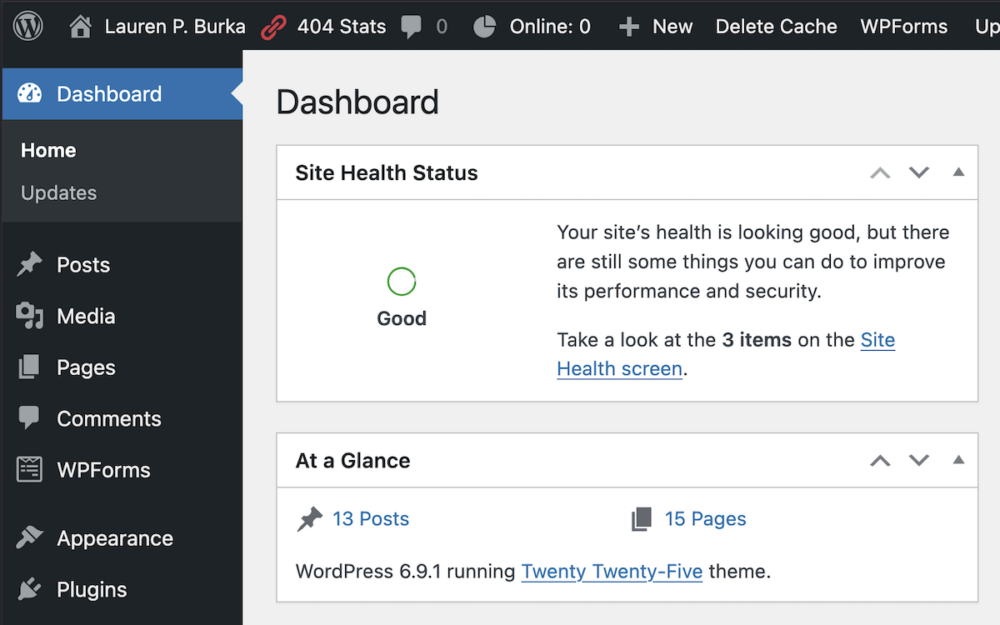
    Because I wanted a free theme that I knew would continue to work for years, I decided to limit myself to themes produced by wordpress.org, which creates a new theme every year. After messing with a few of them, I settled on the 2025 theme. It looks simple and is easy to read.

    It is possible to edit a theme to look like anything if you’re willing to code your own CSS. I decided that CSS is a hard limit for me. I don’t want to learn it or maintain it. But if you do, you can make your theme sit up and do tricks.

    How much money am I spending so far? $120/year US. Keep an eye on this number, because it’s going to go up. Am I going to make this money back on book sales? Not yet. But if I don’t spend it, getting those sales is going to be much, much more difficult.

    Next time I’m going to show you what this site looks like behind the magic curtain and how I use this and other sites to build an audience and drive sales. Meanwhile, take a look around and make yourself comfortable in my virtual web home.

  • Why I don’t use AI

    Let’s get this straight.

    The things that people call AI aren’t AI. They’re not intelligent. Large Language Models are spicy autocomplete. Every time your phone changes “fucking” to “ducking,” you’re getting a reminder that there is no intelligent life here.

    Now that we’ve got that out of the way, I want to assure you that I will not be addressing any of the pressing moral issues surrounding using LLMs in the process of writing books. I’m not going to tell you why you should or shouldn’t use AI. I’m going to tell you why I don’t use it.

    I’m getting old, and I’m not changing my writing process.

    Once upon a time, I knew I wanted to be a writer. The problem was I had horrible handwriting. As a doctor, my dad was legally required to have handwriting that confused pharmacists. Mine was worse. Therefore, I learned to type. My first foray into the art of touch typing was on an assortment of creaky old manual typewriters owned by a summer camp I attended. I was horrible at it, slow and inaccurate with a tendency to drift away from home row. The typing teacher despaired.

    My middle school purchased a dozen instances of the boat anchor-sized, loudly-humming device known as the IBM Selectric. I improved slowly and got indifferent grades in the class. I could type faster in Spanish than I could in English for some reason and used to practice by typing my Spanish homework. But I got going and eventually managed to break twenty or thirty WPM touch-typing. A kindly and somewhat drunk uncle who could hold down no job but working at the pawn shop provided me with an Olivetti, which I used for term papers.

    At that point, due to frustration and running out of correction fluid, I managed to scrape up enough money—largely through accumulated birthday gifts from relatives and summer job earnings—to purchase my first computer: an Apple 2e with the brand-new 80 column card. My typing improved. So did my summer earnings. In those days, if one could type, even slowly and with many corrections, it was possible to earn as much as $8/hr working for a temp agency. I began picking up speed through enforcement by the torture device known as the Dictaphone.

    By the time I needed summer money during college, I could hit one hundred words per minute while using WordStar.

    I think with my fingers, by which I mean that I touch-type. If I need to text more than a word or two, I wait until I come home and sit down at my computer to do it, because I can’t thumb-type. If I’ve finished one book and need to start another one, I take a little time to let ideas cook while knitting a sweater or a pair of socks, then sit down and start typing until the story flows up my fingers to my brain. It may take me a month to write the first thousand words, but only two or three more months to finish the book.

    I once explained to a kind and well-meaning friend that the slow part at the beginning of writing a fantasy novel was coming up with names for everything. Said kind and well-meaning friend offered to take a few example names and run them through Chat-GPT for me, thereby saving me, they said, lots of time. I had to gently, then firmly, then loudly talk them out of trying to help me. Thinking up names for people, places and concepts may be slow, but while I’m doing it, I’m inventing the world. Naming things the way Adam named the animals is how I make a world real to me. If it’s not real to me, it’s not going to be real to the reader (that’s you). Chat-GPT can maybe kind of sort of do this, but it can’t do it the way I do it. You’re reading my book, not Chat-GPT’s. By the way, did you know that to a French speaker, Chat-GPT sounds like “cat, I farted?” (chat, j’ai pété.)

    I have all the time in the world.

    Do the math: if you can write 1,000 words per day, you can write four books a year, easy. This is tricky if you have to hold down a job and take care of kids but not if you don’t.

    LLM-based tools appeal to people who don’t have enough time. Because my health cratered twenty-five years ago and dumped me straight out of the job market and into the wonderful world of “medical retirement,” I don’t lack for time. I don’t even leave the house much, and when I do, I return feeling like I barely escaped with my life. I write, knit and have (checks) over 12,000 hours in Stellaris. And I only need so many sweaters and pairs of socks. Most of my days are spent alternating between playing this or that 4X game, waiting on hold with the doctor’s office and suddenly getting an idea and writing 500 words.

    If I’m not writing, I’m not anyone.

    So why would I use an LLM again?

    Incidentally

    Did you notice that I use em-dashes? For giggles, I pulled up a copy of Wishbone, a book that was first published in 2010. I used fifty-nine em-dashes, though they are rendered as pairs of hyphens, because that’s was what we did then. Did you know that Wishbone is one of the books slurped up and used to train that LLM that’s the subject of a famous lawsuit? If you see an em-dash in one of my books, you can be absolutely secure in the knowledge that it’s not because an LLM wrote it. LLM’s learned about em-dashes from me.


  • Cover art: Why are we doing this to ourselves (again?)

    I have an aunt who, gods bless her, has written over 140 romance novels. I have a memory dating to some time in the 1980’s of her holding up a genuine paperback copy of one of her romances. “I can’t believe this cover,” she said, pointing out the gray-haired man groping the heroine who, according to romance traditions, was supposed to be about twenty-two. “He looks like a Geritol ad.”


    Readers have funny ideas about cover art. For instance, they think that the author chooses it. In reality this never happens. The cover art in traditionally published novels is chosen by an art department, possibly but not necessarily in consultation with the editor and the author. The art is supposed to draw the eye of a potential purchaser and make them touch the physical book and, hopefully, buy it, bring it home, read it, review it, and convince their friends to read it too. The final book cover has always been constrained by artists, models, ideas about colors and assorted semiotics, all permuted through the hurry-up-and-wait publication schedule. If the characters in the cover look like the author thinks the characters look, it’s probably a happy coincidence.


    Back in the day you could tell a book was science fiction because it had:

    • An aerodynamic-looking space ship. The ship had to be aerodynamic-looking even though it would never enter the atmosphere.
    • A babe breasting boobily in a chainmail bikini.


    These elements were required on all sci-fi covers even if the actual book contained no boobily breasting babes or space ships. If the reader is disappointed by the lack of boobs and/or ships, it doesn’t matter, because they’ve already paid.


    At some point this changed. I credit cover artist Michael Whelan. If you don’t know who he is, go look up his work.


    The best piece of cover art I ever got was probably the cover for my first chapbook, Mate, published in 1992. The artist worked for free. I fed her an idea, and she ran with it. I got one phone call from her. She asked me, “Mind if I have some fun with the horse?” I told her to go for it (if people are doing things for you for free, you don’t feel like you can ask for much). She sketched the chess knight and the riding whip, and bolstered the details with the press-on stuff made by Letraset that everyone used to use. You can check out the attitude on that chess knight’s face on my web site. I have the knight and whip as a tattoo on my left arm. I remember the cover artist’s eyes opening very, very wide when I showed it to her. “Yes,” I said. “I will have your art on my body when I’m 90 years old and everything sags.”


    Nota Bene: The artist who rendered the tattoo was, in fact, an artist, a highly-regarded, well-known one. She made some notable contributions, such as flipping the art left-to-right so that the horse would be facing front. This is the kind of detail that an artist notices, and why she was worth every penny.


    For reasons that I’m about to get into, I’m unlikely to have cover art that I want on my body ever again. I’ll be lucky if I ever get cover art that I can look at without feeling embarrassed.


    The reason for that is that the industry has decided that the way around the expense and bother of using human cover artists is to use AI generation. Let’s be clear on what this means.


    There is no such thing as artificial intelligence. When I was in grad school in the 90’s, the word was that AI had been just around the corner for so many decades that researchers were advised to take whatever they had and call it AI or lose their funding. That’s an ongoing process.


    Now we have large language models built out of surplus graphics cards sold off by failed crypto firms, using truly astonishing amounts of water and energy, sucking down all the Geritol ads, rocket ships, moths (for some reason moths are really in for book covers right now) and breastily boobing bikini babes that have ever been used to illustrate a cover and spit out the kind of uncanny valley results that will immediately provide a source of endless amusement to readers of r/fantasyromance or other such online gatherings. Artists will point out all of the obvious AI art tells, the six fingered hands and sunken eyes, and readers will immediately conclude that the authors who use AI art for their covers do not care about their readers, that the text of the books are probably AI generated and not worth anyone’s time or effort to read. They will think the the author chose the art, because readers always think that. The discussions will be hilarious, unless it’s your book, in which case you’ll read it and burst into tears.

    How do I know this? It’s happening right now. Go look.


    Let’s talk about skuomorphs. You know what they are. Just like early iPhones used a yellow lined facsimile of a notepad because users all (used to) know what a note pad looks like and how it’s used, just like early ceramic artists made jugs in the same shape as a hollowed out gourd because everyone knew how to use one of those, book covers these days are cast in the outdated form of something that used to be appropriate but now makes no sense.


    If a book isn’t sitting on a shelf, if it’s read and consumed solely on a palm-sized device where the details are too small to see, why does everyone insist on having a human figure straight out of the uncanny valley on the cover? Who does this benefit? Certainly not visually impaired readers who are using text to speech or screen readers to navigate your books. And they’re the lucky ones, because they don’t have to see the figures with uneven eyes or cut-off fingers.

    I’d much rather have a book cover with a readable font that says what’s inside. I’ve heard that readers have come to expect that the more discreet the cover, the hotter the contents.


    But this is just about me. If you use an AI generated cover, I will not judge. Neither will I read.